Collection: COMMS - FALCONCLAW
PRE-ORDER NOW
PRE-ORDERS ARRIVE 7th DECEMBER
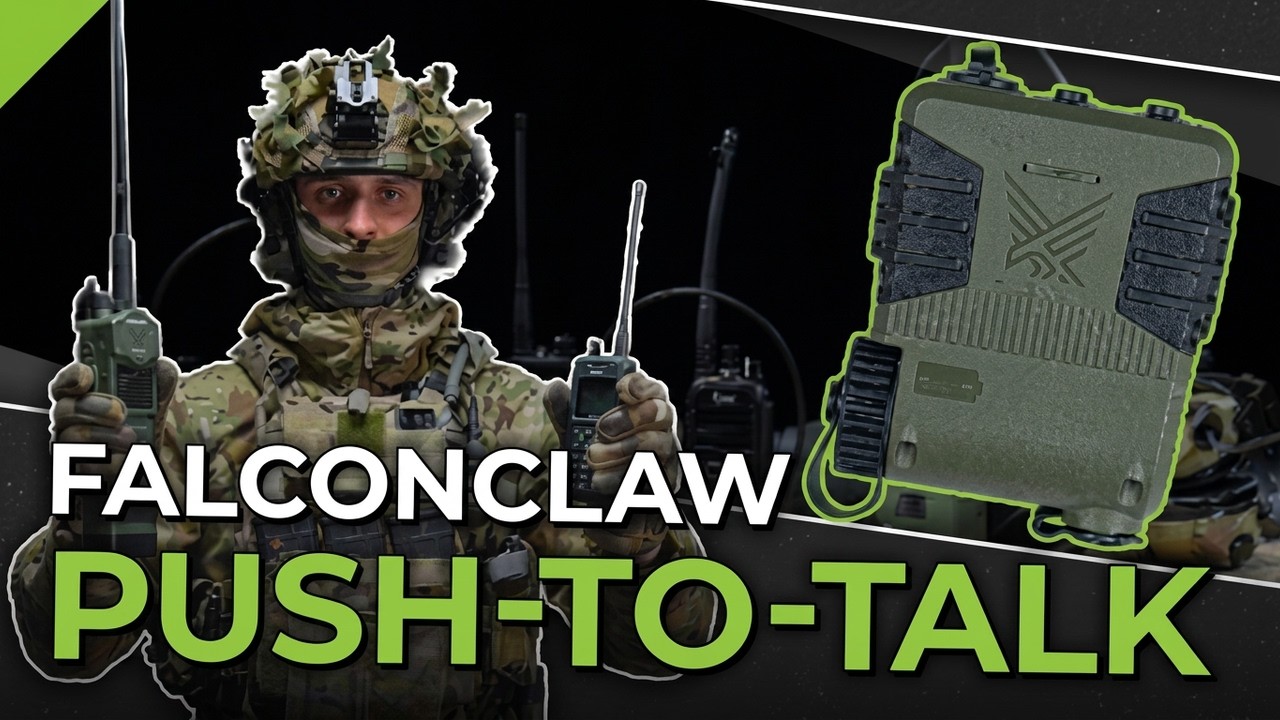
VIDEO OVERVIEW - FALCONCLAW PTT
Most push-to-talks are married to one radio and one headset standard. Estonian reservists could not find one that did everything they needed, so they built it: works with both NATO and Peltor wired hearing protection out of the box, switches to any of 1200+ radios by changing only the downlead cable, and pairs over Bluetooth for Zello, ATAK voice and calls past radio range. A year in the making, field-tested before it shipped.
NATO + PELTOR IN ONE
Both wired hearing-protection standards out of the box. Flip the A-B switch to match your headset; there is no separate version to buy.
ANY RADIO, JUST SWAP THE CABLE
1200+ radio models supported. Change platforms by swapping only the downlead cable instead of buying a whole new PTT.
BLUETOOTH FOR ZELLO AND ATAK
Pair to a phone and you get two things. Voice apps like Zello, to reach a TOC or a drone team far outside radio range and your phone's audio in your earpro, so anything the phone plays reaches you without pulling it out.
WORKS WITH NO BATTERY
Radio comms, the onboard electret mic and the switches all work without power. The CR123A only feeds the Bluetooth side.
Four people, four different setups, one PTT. None of these need a second unit.
NO MIC ON HEADSET?
The mic is in the PTT body. Flip the mic switch to onboard and talk, even if the headset has no boom mic at all.
DIFFERENT HEADSETS?
Both wiring standards live in the same unit. Flip the wiring switch between Peltor and NATO and it works.
DIFFERENT RADIOS?
Same PTT, different downlead. Hook up the cable that matches your radio and you are on the net.
OUT OF RADIO RANGE?
Pair the PTT to a phone and keep talking over Zello once the rest of the team is past what the radio will carry.
TWO BUTTONS, TWO SWITCHES

- NEXUS PLUGThe headset side. Any headset with a Nexus downlead plugs in here.
- WIRING SWITCH, A-BA is Peltor wiring, B is NATO. Set it to match the headset you are wearing.
- MIC SWITCH, C-DC is the onboard mic in the PTT body, D is the headset's own mic. Radio side only: over Bluetooth the onboard mic is always used, whatever the switch says.
- RADIO PTTHold it to transmit on your radio. It works with no battery in the unit. The button sits inside a raised guard, which reduces accidental presses.
- ZELLO PTTThe bigger button on the other side, inside its own raised guard. Hold it to transmit from your phone.
- BLUETOOTH BUTTONThe smaller one below it. Hold 5 seconds to switch the smart features on, 10 seconds to go into pairing.
- BATTERY CAPOne CR123A goes in from the side, under this cap. It feeds the smart features only.
- RADIO DOWNLEADThe cable that matches your radio plugs in here. New radio, new cable, same PTT.
YOUR PHONE ON THE SAME HEADSET
One CR123 wakes the Bluetooth side, and that is the only thing it powers. Radio comms, the onboard mic and both switches keep working with the battery out. With a phone paired you can talk on Zello, or any other voice app, to people well past what the radio will carry. The radio button and the phone button work independently, so keying one does not touch the other.
Bluetooth always uses the onboard mic. Zello, calls and every voice app transmit through the mic in the PTT body. The headset mic works on the radio side only, and the C–D switch has no effect on Bluetooth.
Whatever the phone plays reaches your ears through the same headset: voice apps, navigation prompts, a call. ATAK does not speak its alerts by itself. Pair it with software that reads them out and the PTT carries that audio like anything else the phone plays. We do not ship or support such software.
MOUNTING OPTIONS

Pre-attached. Good for range or quick setups.

CONNECT ANYTHING
Four chains, one PTT at the end of all of them. Find yours, and everything that chain needs is in the chain.
Two pins, no downlead, no boom mic. The adapter gets it into the PTT and the PTT mic does the rest.


AND THE AUX CABLE RUNS BACKWARDS
It was built to connect hearing protection with a 3.5mm jack. It works the other way too: everything coming off your radio can go into anything with a 3.5mm input.
RADIO INTO A COMPUTER
The radio becomes a microphone input. Record the net, run it through transcription, translate it, or relay it into Zello or any voice app so the people sitting at computers hear the traffic as it happens. The tool in our video is our own and is not public, so bring your own software.
RADIO ONTO A SPEAKER
Plug into any powered speaker and a command post monitors the net out loud, with nobody wearing a headset.
RADIO THROUGH THE VEHICLE
Plug into the vehicle AUX input and the whole crew hears the net through the car speakers. One radio in, comms for everyone in the vehicle.

RADIO ON YOUR BACK?
+50 cm between the PTT and the downlead.

TWO RADIOS?
Splits one headset into two PTTs, one per radio. You need two PTTs.
EVERY ORDER
WHAT'S IN THE BOX
- Falconclaw PTT belt clip pre-attached
- Molle clip
- Amplification adapter
- Allen key + thread-locker for bolting on the Molle clip
- User manual
-
DUAL COM ADAPTER CABLE
Regular price $65.00 NZDRegular priceUnit price per -
NEXUS TO 3.5 MM AUX
Regular price $75.00 NZDRegular priceUnit price per -
KENWOOD PTT DOWNLEAD CABLE
Regular price $45.00 NZDRegular priceUnit price per -
FALCONCLAW PTT
Regular price $299.00 NZDRegular priceUnit price per


